Understanding Cursor Pricing
I’m obsessed with Cursor lately.


I’m obsessed with Cursor lately.
And I spend a lot of time experimenting with different models. I have a few favourites and can see the differences in quality, but I can’t say I’m loyal to any of them.
Claude Sonnet and Opus for complex reasoning, GPT-5.x when I want a different perspective, Haiku or Composer for quick iterations. I switch between them depending on the mood and the problem.
All of this was smooth until I hit my limits recently while testing GPT-5.4. That forced downtime finally pushed me to understand how Cursor pricing actually works. It comes down to two key factors: the model you use and the context you send.
For a simple prompt like**> make the border darker**, what Cursor actually sends to the model is much bigger. It’s your prompt plus the agent instructions, referenced files, open tabs, and previous conversation history. All of that is your context, and all of it costs money.
And of course, I was expecting a newer, more powerful model to cost more. But the gap sometimes is huge! The same $20 credits gives you ~700 requests on Gemini Flash but only 34 on Claude Opus. That’s a 20x difference!
Let me break it all down.
Auto vs. Max mode
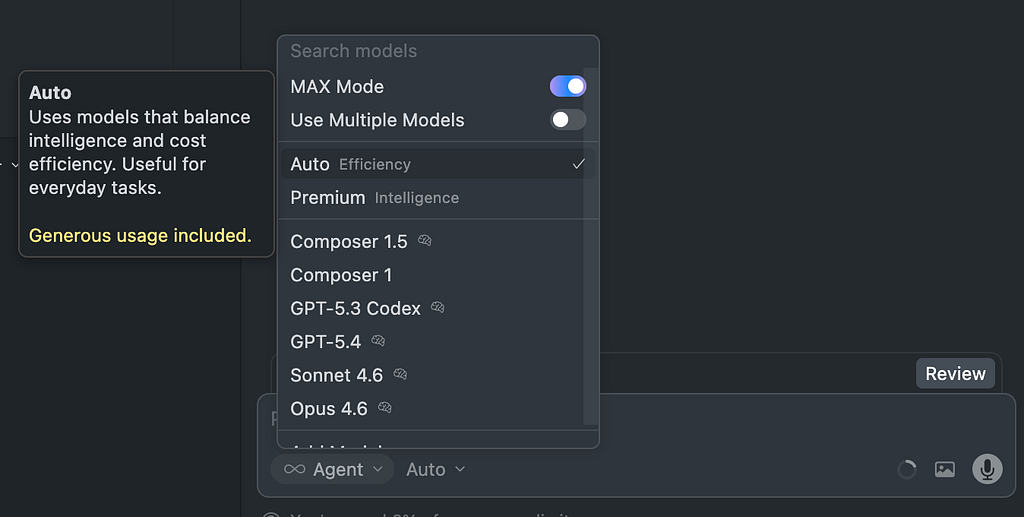
Cursor splits usage into two separate pools. This is the most important thing to understand before anything else.
Auto Mode
When you select Auto or Composer 1.5 as your model, requests draw from a dedicated pool with significantly higher limits. Cursor can afford to be generous here because these are their own models.
- Auto automatically selects a cost-efficient model for each task. It’s fast and capable for routine work, but can be weak in handling complex tasks.
- Composer 1.5 is Cursor’s new agentic coding model and scores above Claude Sonnet 4.5 on coding benchmarks. It’s designed for multi-file, multi-step agent tasks. The kind of work that would burn through API credits fast on a frontier model.
Auto mode supports context up to ~200K, roughly 15,000 lines of code.
Max Mode (API)
When you manually select a specific model like Claude Sonnet, GPT-5, Gemini Pro, etc, each request is billed at that model’s actual API token price, deducted from your allowance. This is where costs vary wildly and where we need to pay attention.
Max Mode supports context up to 1M for some models! But it costs significantly more, with an approximately 20% overcharge on top of standard rates.
Both pools reset monthly. The key insight is that if you stick to Auto and Composer 1.5 for most of your work, you’ll rarely touch your API credits. Save the API pool for when you specifically need a beefier model.
What is Context?
This is the part that confused me the most. Context is everything cursor sends to the model in a single request.
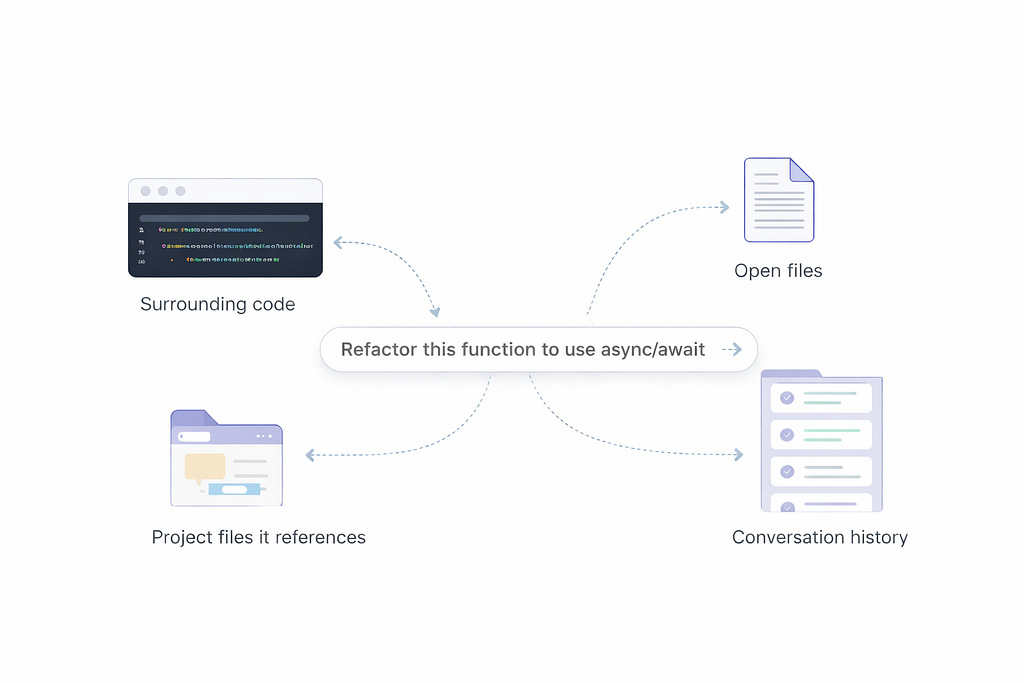
Context = Referenced Files + Conversation History
All of this is measured in tokens. One token is roughly a word. (3/4 of a word actually)
The more context, the more input tokens consumed, and the higher the cost.
A question about a single function sends a fraction of the tokens that a multi-file refactor does.
Cache Reads
When Cursor reuses parts of a previous prompt or the same files you had open, it charges the cache read rate instead of the full input price. That’s roughly a 90% discount on those tokens. This is why follow-up questions in the same conversation are often cheaper than starting fresh.
follow-up questions in the same conversation are cheaper than starting fresh
How Different Prompts Affect Cost
Not all prompts are equal.
Here are some specific examples to understand how different types of requests can affect cost:
> Explain what this function does 🟢
Cheap. Small context, short output. Mostly uses input tokens with minimal output.
> Refactor this file to use async/await 🟡
Medium context, moderate output. Cursor reads the full file and generates new code. Since output tokens cost 2–5x more than input tokens, code generation is always pricier than code analysis.
> Implement authentication across these 8 files 🔴
Large context, heavy output. Multiple files loaded into context, plus hundreds of lines generated. On Claude Sonnet, this can be a large chunk of your monthly tokens.
> Agent Mode 🔴 🔴
Multi-step autonomous tasks. Each step is a separate API call at roughly $0.04 each. A complex agent task can make dozens of calls behind the scenes.
Plan Before Using Agent Mode
One simple habit which dramatically improves agent results is to start with a plan before asking it to write code.
Instead of immediately prompting something like:
> Implement authentication across these 8 files
First, ask the model to outline the approach in Plan mode.
> How would you implement authentication across these files?
Cursor will generate a step-by-step plan that you can review and steer before the agent starts implementing changes.
This does two important things:
- It helps the model reason through the architecture before making changes.
- It reduces unnecessary iterations and extra API calls.
Agents perform best when the task is clearly defined and scoped. A short planning step often saves both time and tokens.
Use a stronger model for planning and a cheaper one for execution
Another useful pattern is to use a stronger model for planning and a cheaper one for execution. Planning benefits from better reasoning, but it produces very little output. The expensive part is usually the code generation step, so switching to a cheaper model for implementation based on the detailed plan can dramatically reduce token usage.
The takeaway: asking Cursor to write code costs significantly more than asking it to explain code. Same model, same context, but the output-heavy request drains your credits much faster.
Asking Cursor to write code costs significantly more than asking it to explain code
How Far Does $20 Monthly Credits Go?
The same $20 pool gives you a dramatically different number of requests depending on which model you choose:
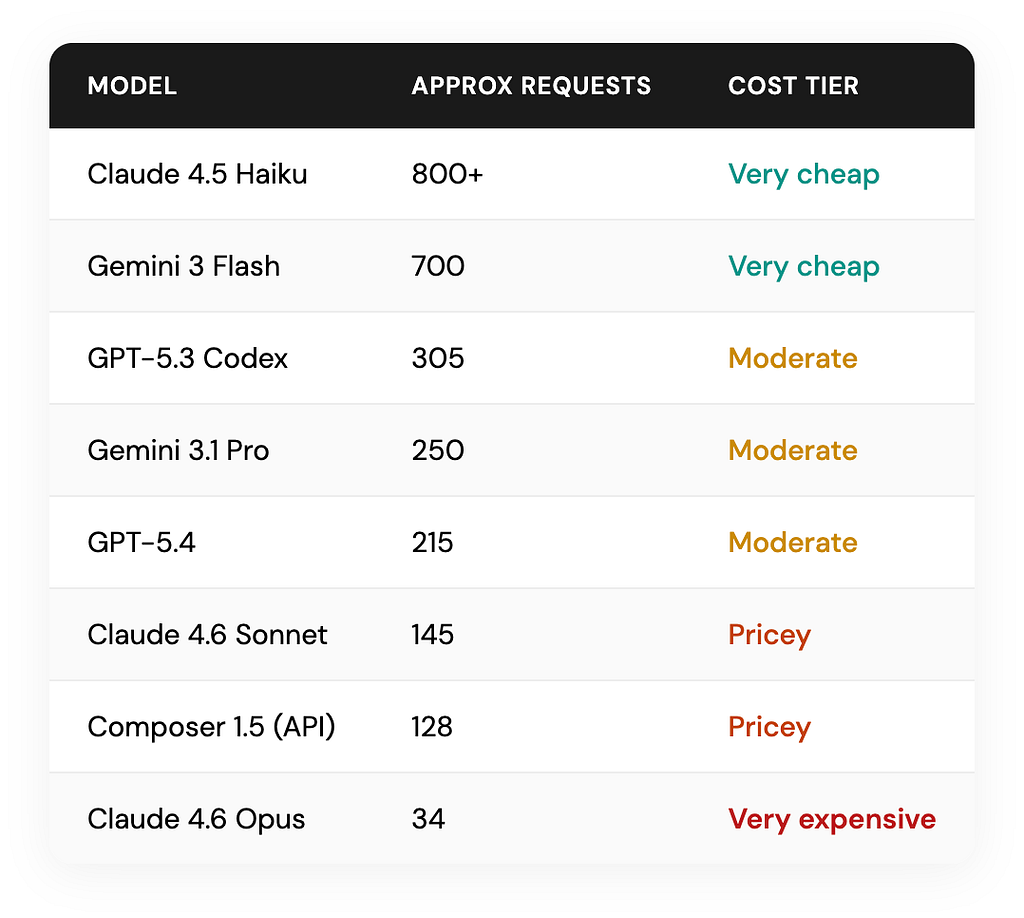
Claude Opus burns credits roughly 20 times faster than Gemini Flash. The same $20 that gives you around 700 Flash requests might only cover about ~34 Opus prompts.
The Per-Token Breakdown
If you want to do the math, here’s what each model charges per 1 million tokens:
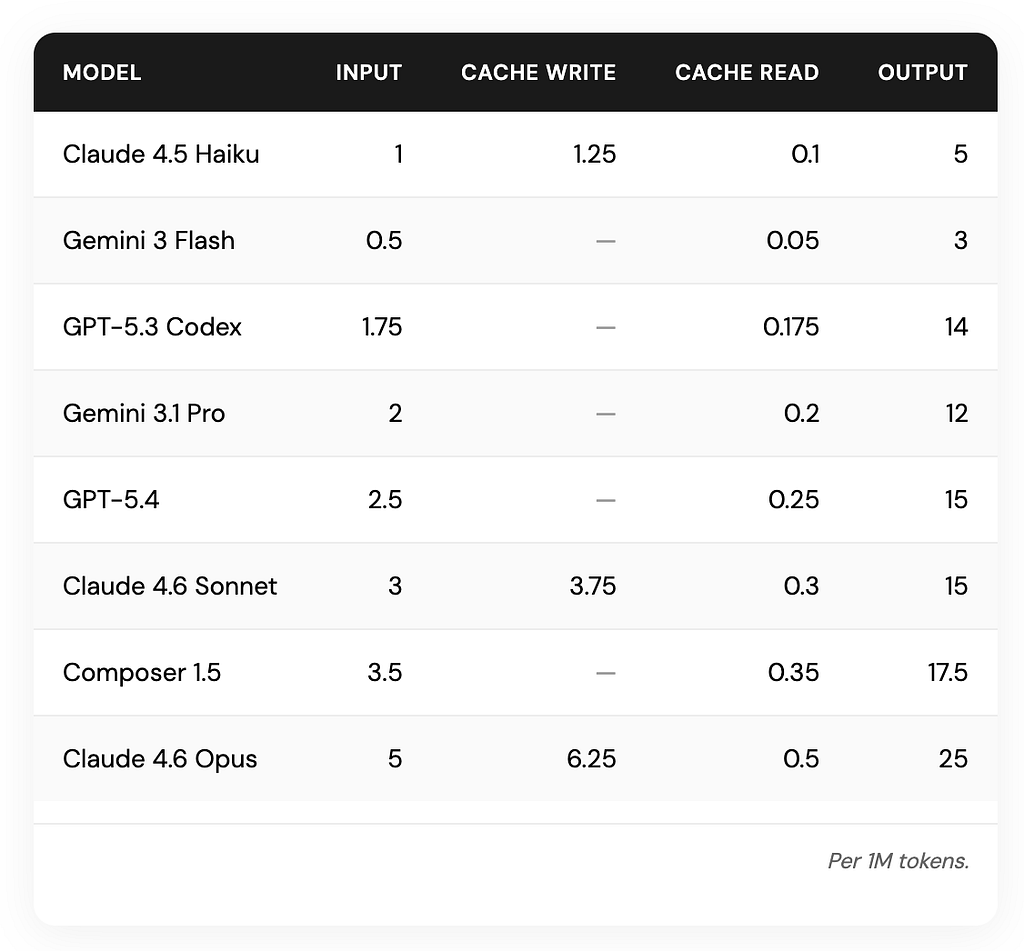
Based on cursor model pricing on 03/2026
Notice the output column. Output tokens are consistently 2–5 times more expensive than input tokens across every model.
Monitoring cost
The easiest way to keep track of your spending is to enable the usage summary to always be shown in cursor settings.
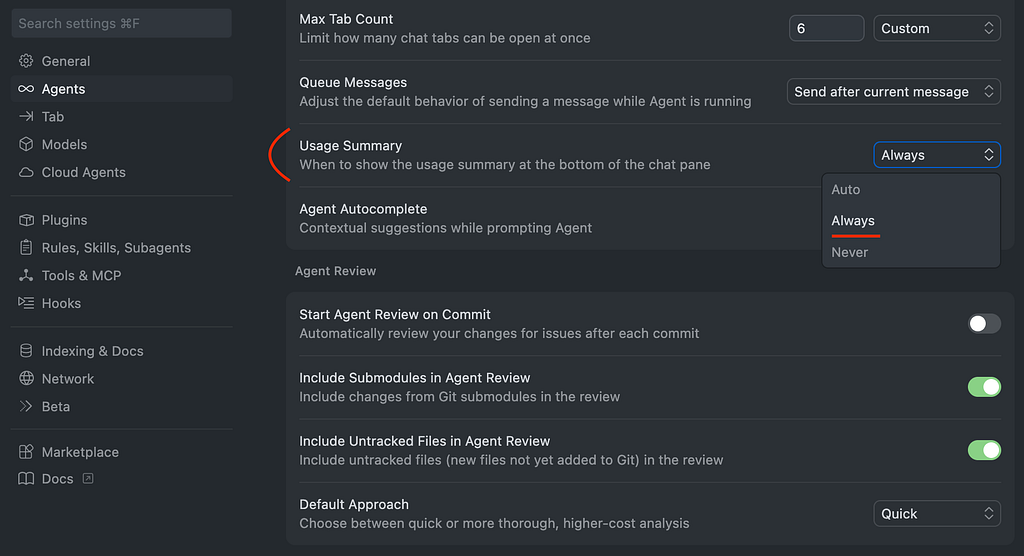
Cursor Settings > Agents > Usage Summary
Then your usage will always be visible.
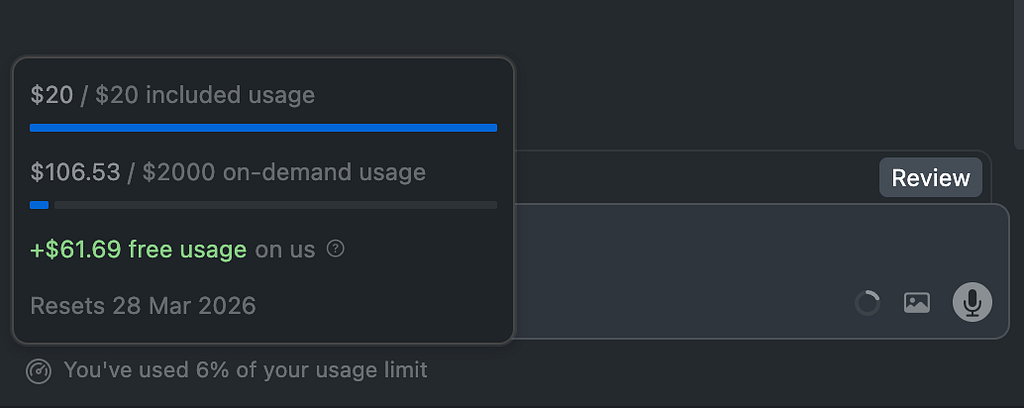
By default, the auto mode displays this information only after usage exceeds 80%, which is often too late.
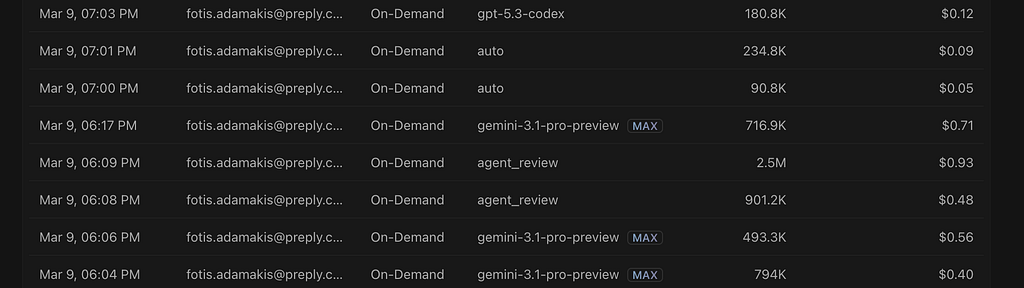
And if you want a more detailed analysis of each one of your requests, you can find it in the cursor usage dashboard.
Remember, most of your Cursor costs come from five things: the model you choose, how much code you include in context, whether you generate or analyze code, using Max Mode, and how heavily you rely on Agent Mode.
Practical Tips
1. Match the model to the task
Use cheaper models like Composer (Auto mode) Gemini flash for straightforward work. Reserve Premium models like Claude Sonnet for tasks that really require stronger reasoning.
2. Ask to explain before rewrite
When you just need understanding, don’t pay for code generation. The ask-first approach also helps you write better follow-up prompts.
3. Break large tasks into smaller prompts
This reduces context size and gives you more control over costs.
4. Only include the files you actually need in context
Large multi-file prompts dramatically increase token usage, so referencing fewer files can make a big difference.
5. Start with a plan before asking the agent to code
Agents perform much better when the task is clearly scoped first, and it often reduces unnecessary API calls.
6. Plan and execute with different models
Use a stronger model to plan, then switch to a cheaper model to implement it. Planning benefits from better reasoning, while the expensive part is usually the code generation.
7. Tab completion is free
Use them liberally. They don’t touch your credit pool at all.
8. Monitor Usage
Credits can disappear quickly during heavy Agent Mode or premium model sessions. Monitoring usage helps avoid surprises.
Conclusion
Cursor is an incredible tool, but the biggest factor in cost is how we use it. Most surprises come from running heavy models or agent workflows without realising how many tokens or API calls are involved.
In practice, the biggest savings come from a few habits: keeping context small, breaking large tasks into smaller prompts, asking the model to explain before generating code, and using stronger models only when the problem truly requires it.
Another important skill is knowing when to use an autonomous agent and when a simple prompt is enough. Agents are incredibly powerful for multi-step work across many files, but they can trigger dozens of API calls behind the scenes. For smaller tasks, a smaller prompt is often faster and cheaper.
Additional resources
Keep reading