SKILL.md has 14+ metadata fields. Use them correctly.
Every SKILL.md file starts with a configuration block. This is where you set the skill's name, description, and a handful of optional settings that control how

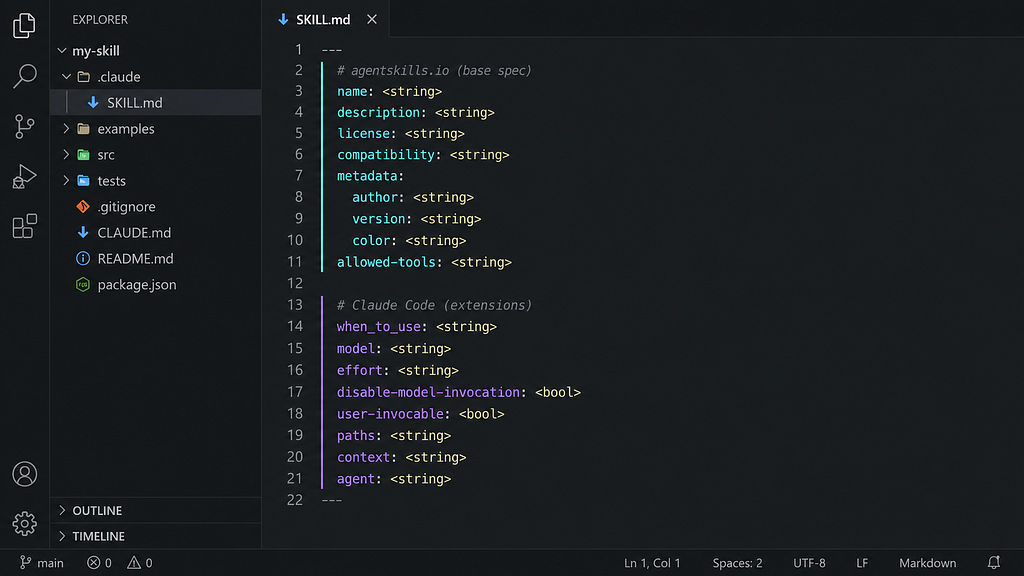
Every SKILL.md file starts with a configuration block. This is where you set the skill’s name, description, and a handful of optional settings that control how it behaves.
There are actually more than 14 fields available. Six come from the Agent Skills open standard, which means they work across any tool that supports the spec. The rest are Claude Code extensions. Knowing which is which matters if you want to share skills or use them outside Claude.
The base spec
The official specification defines six fields. Two are required (name, description), four are optional (license, compatibility, metadata, allowed-tools).
\---
name: pdf-processing
description: Extract text and tables from PDF files, fill forms, merge documents. Use when working with PDFs, forms, or document extraction.
license: Apache-2.0
compatibility: Requires Python 3.10+ and pdfplumber
metadata:
  author: your-org
  version: "1.2"
  color: "#4A90E2"
allowed-tools: Read, Bash
\---
name
Must match the directory name: lowercase letters, numbers, and hyphens only, max 64 characters, no consecutive hyphens, no leading or trailing hyphens.
description
The most important field. It loads at startup for every installed skill (around 100 tokens each), and it’s what the agent reads when deciding whether to activate a skill.
Two rules matter here. First, write in third person. The description is injected directly into the system prompt, and first-person language breaks the framing and causes inconsistent matching.
\# Wrong
description: I can help you process Excel files
\# Right
description: Processes Excel files and generates reports
Second, answer both questions: what does this skill do, and when should it be used? Most descriptions cover the first and skip the second.
\# Too vague
description: Helps with PDFs.
\# Works
description: Extracts text and tables from PDF files, fills forms, and merges PDFs. Use when the user mentions PDFs, forms, or document extraction.
The limit is 1,024 characters. If your skill isn’t triggering when you expect, the description is always the first thing to look at.
license
A short string: either a standard SPDX identifier (Apache-2.0, MIT) or a reference to a bundled license file.
license: Proprietary. LICENSE.txt has complete terms.compatibility
Notes any environment requirements. Most skills don’t need this, but it’s useful when your skill depends on something non-obvious like a specific runtime version or network access.
compatibility: Requires Python 3.14+ and uv
compatibility: Requires git, docker, and internet access
metadata
An arbitrary key-value map for anything the spec doesn’t cover. This is the right place for author, version, or UI hints like color, rather than inventing top-level fields outside the standard. Whether any client actually reads and acts on these values is up to the implementation.
metadata:
  author: your-org
  version: "1.0"
  color: "#4A90E2"
allowed-tools
Restricts which tools the agent can use while the skill is active. Marked experimental in the spec, but works reliably in Claude Code. When set, Claude can use those tools without asking for approval. Omit it and no restrictions apply.
allowed-tools: Read, Grep, Glob, BashUseful for read-only workflows (audits, onboarding guides) or security-sensitive contexts where you want to be explicit about what the skill can touch. You can also scope individual bash commands:
allowed-tools: Bash(git add \*) Bash(git commit \*) Bash(git status \*)Claude Code extensions
On top of the base spec, Claude Code adds its own configuration fields. These won’t be recognised by other tools that implement the agentskills.io standard.
when_to_use
A companion to description, appended to it in the skill listing. Useful for separating the what from the when without cramming both into one paragraph.
description: Analyzes BigQuery data across sales, finance, and product tables.
when\_to\_use: Use when the user asks about revenue metrics, pipeline data, API usage, or any SQL question.
model and effort
model pins which Claude model runs when the skill is active. effort sets the reasoning depth: low, medium, high, xhigh, or max.
model: haiku
effort: low
Use these to right-size compute for the task. A formatting or lookup skill doesn’t need the same horsepower as a security audit.
disable-model-invocation
Set to true to prevent Claude from activating the skill automatically. It only runs when you type /skill-name directly. Use this for anything with side effects (deploys, commits, messages) where you want to control timing yourself. With this set, the skill’s description is also removed from Claude’s context entirely, so it won’t even surface the suggestion.
\---
name: deploy
description: Deploy the application to production
disable-model-invocation: true
\---
user-invocable
Set to false to hide the skill from the / menu while still letting Claude activate it automatically. Use for background knowledge that isn’t meaningful as a command. A legacy-system-context skill explaining an old architecture is something Claude should know about when relevant, but /legacy-system-context isn’t a useful thing for a user to type.
To summarise how the two fields interact: by default both you and Claude can invoke any skill. disable-model-invocation: true means only you can invoke it. user-invocable: false means only Claude can.
paths
Limits auto-activation to specific file patterns. When set, Claude only loads the skill when you’re working with matching files.
paths: "\*\*/\*.sql, \*\*/migrations/\*\*"Useful for keeping language-specific or domain-specific skills out of unrelated work.
context and agent
Set context: fork to run the skill in an isolated subagent rather than inline in your conversation. agent specifies which subagent type to use.
\---
name: deep-research
description: Research a topic thoroughly across the codebase.
context: fork
agent: Explore
\---
Research $ARGUMENTS thoroughly:
1\. Find relevant files using Glob and Grep
2\. Read and analyze the code
3\. Summarize findings with specific file references
Built-in options for agent are Explore (read-only, optimised for codebase search), Plan, and general-purpose. You can also reference any custom agent you’ve defined in .claude/agents/.
Skills in Subagents
This is the thing that caught me off guard: skills do not automatically propagate to subagents.
When Claude spins up a subagent, it starts fresh. It does not inherit the skills loaded in your main session. If a skill is load-bearing for a subagent workflow, you have to declare it explicitly in the agent’s AGENT.md:
\---
name: report-agent
description: Generates structured reports from raw data.
skills:
  - pdf-processing
  - data-analysis
\---
You are a specialized reporting agent.
When extracting source data, use the PDF and analysis skills.
With skills set, those skills are preloaded at startup with their full content injected. Without it, a subagent asked to process a PDF has no idea the pdf-processing skill exists and will regenerate the logic from scratch, slower and less consistent. If a skill is required inside a subagent, put it in the list.
Progressive disclosure and scripts
Once a skill is triggered, the full SKILL.md body enters the context window and stays there for the session. Keep it under 500 lines and move detailed reference material to supporting files that Claude only loads when needed.
my-skill/
  SKILL.md
  references/
  scripts/
  assets/
Point to supporting files conditionally in SKILL.md:
For architecture questions, read \`references/architecture-guide.md\`.
For routine tasks, proceed directly.
Keep references one level deep. If SKILL.md links to advanced.md which links to details.md, Claude may preview rather than fully read the nested file and miss content.
Scripts in the skill directory can execute without loading their source into context. Only the output consumes tokens. The instruction matters: tell Claude to run the script, not read it.
Which fields do you actually need?
For most skills the answer is: description, maybe when_to_use, and allowed-tools if you need guardrails. Everything else is for specific situations.
Three cases where you should stop and think about the full list:
Building a subagent workflow. Check context and agent, and make sure the skills your subagent depends on are listed in the skills field of its AGENT.md.
Creating automation with side effects. Use disable-model-invocation: true so Claude cannot trigger the skill without you.
A large or domain-specific skill. Use paths to limit activation scope and progressive disclosure to keep SKILL.md lean.

Keep reading