The Journey of Migrating a tiny Application to Vue 3
By being involved with the Vue community and especially with the Athens and Barcelona meetups, I usually have multiple interactions with…

The Journey of Migrating a tiny Application to Vue 3
By being involved with the Vue community and especially with the Athens and Barcelona meetups, I usually have multiple interactions with people struggling to migrate to Vue 3. On top of that, I’m working myself on a large codebase with many internal and public-facing websites behind it, and migration is a riddle we still need to solve.
Until recently, I thought this was expected. A large codebase comes with big maintenance costs, but as part of my recent article about Vue animations, I needed to update a tiny codebase to the latest version of Vue, since animations are one of the many breaking changes. I faced some issues and documented all the steps in case I’ll save someone some time and frustration.
The Application
The application was created back in 2019 while I was learning Vue animations. I used vue-cli to bootstrap a new application that would host 8 very simple components resulting in this live demo. I didn’t change much from the default configuration except adding storybook later, again for experimentation purposes. This made me believe upgrading would be simple, so I decided to test the official migration guide on it.
Getting started
I decided to follow the official documentation to ensure I do everything right. From the following banner at the top of the official Vue documentation, I got informed that Vue 2 support ends at the end of 2023 and that I need to follow the Migration Guide to upgrade.
Migration Build
Migration guide states that I need to migrate first to the migration build (@vue/compat), which is a build of Vue 3 that offers Vue 2 compatible APIs. Exactly what we need.
Limitations of the migration build
- No third-party library support. If you are using a library like Vuetify, Quasar or ElementUI is not supported
[Internet Explorer 11 is not supported](https://github.com/vuejs/rfcs/blob/master/active-rfcs/0038-vue3-ie11-support.md). That’s good! 😄- Server-side rendering has some issues with the
vue-server-rendererpackage. Especially if you are using Nuxt, you should follow Nuxt 3 migration guide, which is still unstable.
Luckily non of these is a blocker for my tiny application. So let’s get started.
Preparation
Some refactoring is needed beforehand if the deprecated named / scoped slot syntax is used in your project. Again for me, this is not the case, so I moved on.
[Installation](https://v3-migration.vuejs.org/migration-build.html#installation)
1. Upgrade tooling instructions
- If using a custom webpack setup: Upgrade
vue-loaderto ^16.0.0. - If using
vue-cli: upgrade to the latest[@vue/cli-service](http://twitter.com/vue/cli-service "Twitter profile for @vue/cli-service")withvue upgrade - (Alternative) migrate to
[Vite](https://vitejs.dev/) +vite-plugin-vue2. [Example commit]
I’m using vue-cli so vue upgrade is what I have to do.
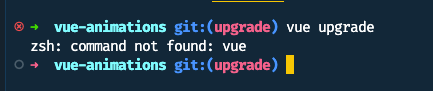
I’m not a big fan of global npm packages, and that’s why Vue-cli was not installed globally. But I did install it after getting the error above with the command npm install -g @vue/cli
After that vue upgrade detected my current version and offered to upgrade them to the latest one, which I accepted.
vue upgrade
But it failed.
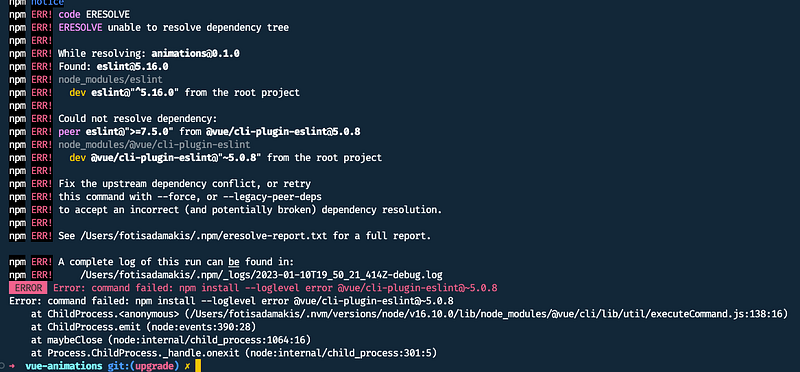
I’ve spent some time on this part trusting vue-cli and believing that the problem was in my node modules cleaning npm cache and making sure that my node version was supported.
(You should have a minimum of node 8.9 with v10+ being recommended by the way.)
After a while, I found [this open issue](https://github.com/vuejs/vue-cli/issues/6864) about my problem in vue-cli that provided the answer.

npm install [@vue/cli-plugin-eslint](http://twitter.com/vue/cli-plugin-eslint "Twitter profile for @vue/cli-plugin-eslint")@5 --legacy-peer-deps
Im not particularly happy about the usage of the --legacy-peer-deps flag but after some [researching on StackOverflow](https://stackoverflow.com/questions/66239691/what-does-npm-install-legacy-peer-deps-do-exactly-when-is-it-recommended-wh) I decided to do it and pretend that I shouldn’t worry about it.
This was only step one.
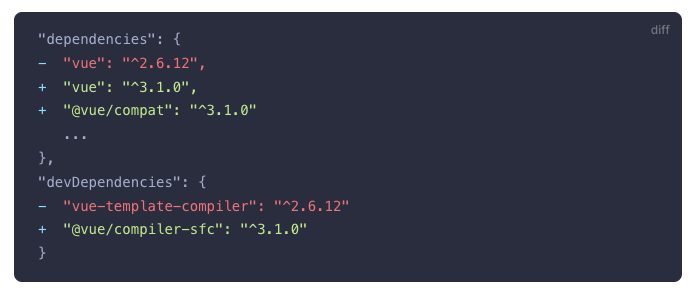
2. Update dependencies
The next step is to update package.json with the new dependencies of Vue
3. Alias Vue to migration build
Next, I needed to alias Vue to use the vue/compat package instead. For my case, I had to update vue-cli config with the chainWebpack option.
module.exports = {
  publicPath: '/vue-animations/', // already existed

  chainWebpack: (config) => {
    config.resolve.alias.set('vue', '@vue/compat')

    config.module
      .rule('vue')
      .use('vue-loader')
      .tap((options) => {
        return {
          ...options,
          compilerOptions: {
            compatConfig: {
              MODE: 2
            }
          }
        }
      })
  }
}
vue.config.js
In case you are using vite or webpack, check the documentation for the change you need to make.
4. Update TypeScript Typings
This project uses plain Javascript, so I skipped this step. Again refer to the [documentation](https://v3-migration.vuejs.org/migration-build.html#upgrade-workflow) for the required steps if needed.
5. Compiler errors
At this point, the documentation has an ambiguous note that I might have some compiler errors, so I guessed is time to build the application. Hopefully, by having a small application without any obvious breaking changes, this will go smoothly.
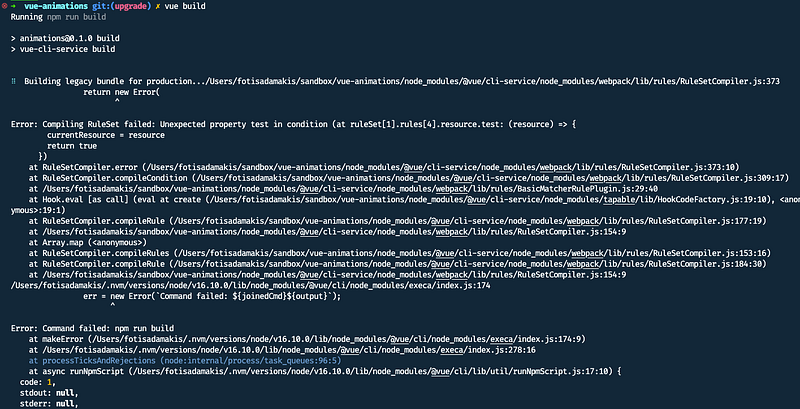
Or not.
After a quick look, I remembered that I updated package.json on step 2 but never installed those dependencies.
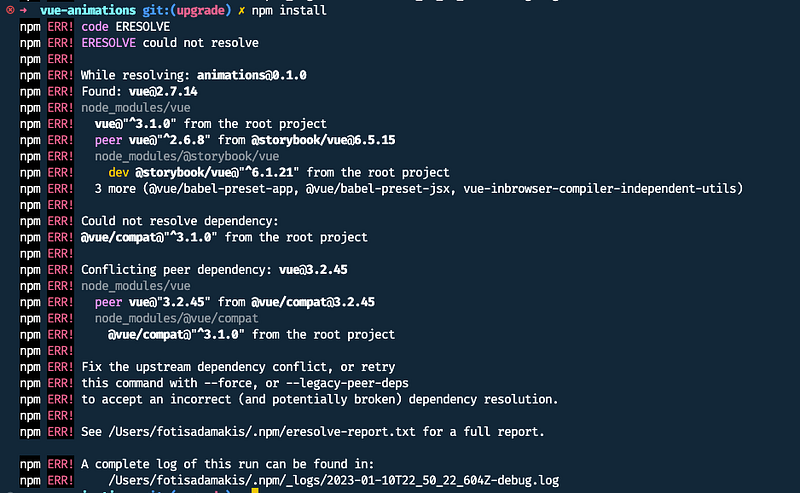
OK, I was expecting storybook to be an issue. I decided to defer this for later by removing it from the dependencies for now.

Trying building again
vue build
This looks like a problem with the ESLint package. I decided to try updating every outdated with npm update
And after updating the application was finally built successfully!
6. Deprecation warnings
As expected, the migration build provides some deprecation warnings. But in my case, the list is small, and each has a link to the documentation, which is very convenient.
[**Mounting App Instance**](https://v3-migration.vuejs.org/breaking-changes/global-api.html#mounting-app-instance)
The old way of mounting the application on Vue prototype
import Vue from "vue";
import App from "./App.vue";

new Vue({
  render: (h) => h(App),
}).$mount("#app");
The new way of mounting the application using createApp helper
import { createApp } from "vue";
import App from "./App.vue";

const app = createApp(App);
app.mount("#app");
[**Transition Group Root Element**](https://v3-migration.vuejs.org/breaking-changes/transition-group.html)
This was simple. The transition group no longer requires a single element after the introduction of fragments. This now makes the tag prop required. The default value in the previous implementation was span so adding tag="span" did the trick.
7. Animation Classes
One change that is not reported is the [renaming of the transition classes](https://v3-migration.vuejs.org/breaking-changes/transition.html).
/\* Transition classes in Vue 2 \*/
.v-enter,
.v-leave-to {
  opacity: 0;
}

.v-leave,
.v-enter-to {
  opacity: 1;
}
/\* Transition classes in Vue 3 \*/
.v-enter-from,
.v-leave-to {
opacity: 0;
}
.v-leave-from,
.v-enter-to {
opacity: 1;
}My application is tiny but was about animation, so this needs to be changed. The steps are
- Replace instances of
.v-enterto.v-enter-from - Replace instances of
.v-leaveto.v-leave-from - Replace transition class prop names. (Which I’m not using)
The solution from the migration guide of doing a project-wide find and replace for .*-enter and .*-leave CSS class names are not that straightforward since other classes and spaces interfere. But there were only 8 occurrences, so I updated them manually.
.fade-enter,
.fade-leave-to {
  opacity: 0;
}
.fade-enter-from,
.fade-leave-to {
opacity: 0;
}8. Upgrading Vuex and Router
The following steps are updating Vuex and [vue-router](https://router.vuejs.org/index.html) to version 4, which I happily skipped since I’m not using them.
9. Removing compatibility build
Finally, since everything is up and running, we can remove the compatibility build. So, remove @vue/compat from your package.json, and don’t forget chainWebpack from the vue.config.js file.
10. Restoring Storybook
npx storybook init --type vue3
Which will install storybook and all of its dependencies.
All done! ✔
You can find the application running here, the final code and the starting point.
Conclusion
Vue used to excite me a lot in the past. My first talk about migration was in 2010, but since then, my mind has changed, and I’ve been pretty vocal about the Vue 3 migration path being handled poorly.
I had to debug a lot of things, manually change some parts and spend a lot of time on StackOverflow even if the majority of the migration steps were not necessary for my small application. In a more realistic one that uses typescript and many other widespread Vue 2 features migration will be time-consuming, risky and will probably require a code freeze.
Even if I’m a big fan of composition API, I firmly believe that Vue rewrite had to be transparent to us, and breaking changes should be kept to the minimum. My biggest concern is that the Vue core team doesn’t seem to acknowledge this and keeps introducing breaking changes like deprecating Vuex over Pinia without consideration of the migration effort. This, in my opinion, is the most significant factor in Vue losing momentum, apparent in the latest state of js survey.
What is your experience with the Vue 3 migration so far? Please share your thoughts or any advice in the comments below.