Git flow
GitFlow is a branching model for Git, created by Vincent Driessen. It has attracted a lot of attention because it is very well suited for…

Introduction to Git flow
GitFlow is a branching model for Git, created by Vincent Driessen. It has attracted a lot of attention because it is very well suited for a release-based software workflow. In addition, it offers a dedicated channel for hotfixes to production.
Gitflow utilizes the core feature of Git, which is the power of branches. In this model, a repository has two main branches master and develop.
Master
This is a highly stable branch that is always production-ready and contains the last release version of source code in production.
Develop
Derived from the master branch, the development branch serves as a branch for integrating different features planned for an upcoming release. This branch may or may not be as stable as the master branch. It is where developers collaborate and merge feature branches.
Apart from those two primary branches, there are three other branches in the workflow: feature, release and hotfix.
Feature
This derives from the develop branch and is used to develop features.
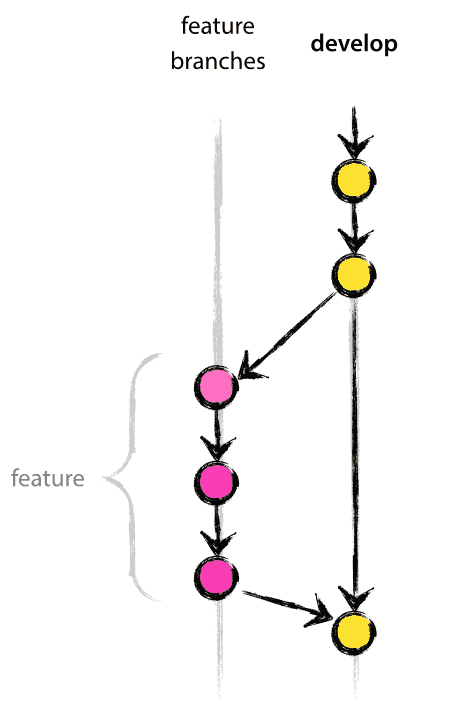
git checkout develop -b featureName
Code and git commit
git checkout develop
git merge —no-ff featureName
git branch -d featureName
git push
Release
This also derives from develop branch but is used during releases.
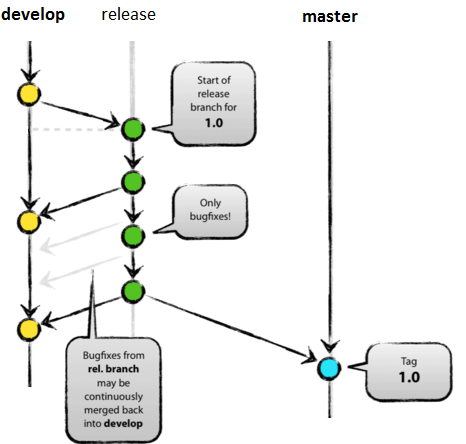
git checkout develop -b release-2.7
Bump version to 2.7
Code and git commit
git checkout master
git merge —no-ff release-2.7
git tag -a release-2.7
git push — tags
git checkout develop
git merge —no-ff release-2.7
git branch -d release-2.7
Hotfix
This derives from the master branch and is used to fix a bug in the production branch that was identified after a release.
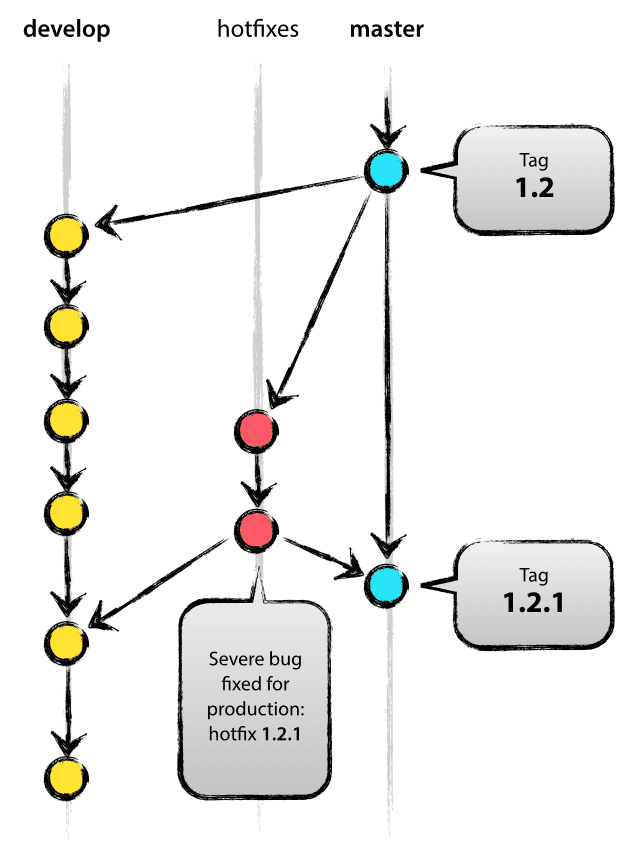
git checkout master -b hotfix-2.7.1
Code and git commit
git checkout master
git merge — no-ff hotfix-2.7.1
git tag -a hotfix-2.7.1
git checkout develop
git merge —no-ff hotfix-2.7.1
git branch -d hotfix-2.7.1
Summary
Git flow has attracted a lot of attention because it is very well suited for collaboration and scaling the development team. It manages all changes through pull requests. It provides strict access control to all changes. You can safely check what is being introduced into the source code.
If you want to introduce GitFlow into your workflow have a look at these links:
Useful links
Keep reading