Vue Render Optimization with v-once and v-memo
Front-end frameworks, like Vue and React, gained popularity as a response to JavaScript’s lack of reactivity.

Vue Render Optimization with v-once and v-memo
Front-end frameworks, like Vue and React, gained popularity as a response to JavaScript’s lack of reactivity.
Let’s see how reactive data differs from non-reactive data in Vue.
<script setup>
import { ref } from "vue";

const a = ref(0);
const b = 0;
</script>

<template>
  <div class="container">
    <div>
      <span>A (Reactive): {{ a }}</span>
      <button @click="a++">Increase A</button>
    </div>
    <div>
      <span>B (Non-Reactive): {{ b }}</span>
      <button @click="b++">Increase B</button>
    </div>
  </div>
</template>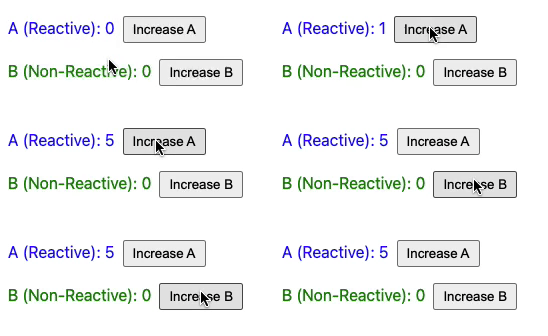
In Vue 3, to achieve reactivity, your data is wrapped within a [proxy](https://developer.mozilla.org/en-US/docs/Web/JavaScript/Reference/Global_Objects/Proxy). This means a small piece of code is executed each time your variable changes, keeping your UI in sync with your data.
However, if your data is declared as reactive but isn’t expected to change, or if its changes don’t need to be reflected in the UI, you can use v-once or v-memo to eliminate executing unnecessary watchers.
[v-once](https://vuejs.org/api/built-in-directives.html#v-once)
Use v-once to render elements just once, avoiding further updates.
It works for variables or a whole component.
<!-- single element -->
<span v-once>This will never change: {{msg}}</span>

<!-- the element have children -->
<div v-once>
  <h1>comment</h1>
  <p>{{msg}}</p>
</div>

<!-- component -->
<MyComponent v-once :comment="msg" />

<!-- `v-for` directive -->
<ul>
  <li v-for="i in list" v-once>{{i}}</li>
</ul>
A change in both msg and list will not affect the UI.
[v-memo](https://vuejs.org/api/built-in-directives.html#v-memo)
Introduced in Vue 3.2, v-memo works similarly.
With v-memo, updates depend on specific data changes, defined in an array. Only when the values within this array change an update to the UI will be triggered.
<template>
  <div v-memo="[valueA, valueB]">
    <!-- content updates only if valueA or valueB change -->
  </div>
</template>
Choosing the right dependencies is crucial. An incorrect array can lead to updates being skipped when they shouldn’t be. A v-memo with no dependencies works like v-once, meaning it only renders the element or component once.
v-memo is useful in performance-critical situations, like rendering large lists with v-for (lists with more than 1000 items, for example).
Consider this code snippet:
<template>
  <div v-for="item in list" :key="item.id" v-memo="[item.id === selected]">
    <p>ID: {{ item.id }} - selected: {{ item.id === selected }}</p>
    <!-- more child nodes -->
  </div>
</template>
Here, v-memo optimizes rendering by updating an item only if its selection status changes. This significantly reduces unnecessary diffing for items whose state hasn’t changed.
Conclusion
To wrap it up, v-once and v-memo are used to keep templates efficient and responsive. v-once is perfect for those one-and-done situations, while v-memo gives you the precision to update only what’s necessary. Both can make a big difference in a data-intensive application. Use them wisely to keep your application running without frame drops.