CSS inherited Vs non inherited properties
One of the rules of CSS that I had to figure out through trial and error, and not a textbook, is that not every property cascades the same…

CSS inherited Vs non inherited properties
One of the rules of CSS that I had to figure out through trial and error, and not a textbook, is that not every property cascades the same way. You set the font-size on a parent, and all the children follow along. But then you try the same thing with margin or width, and… nothing. What’s going on here?
You probably already know this, but CSS is weird™ and inheritance isn’t as straightforward as it sounds. Some properties pass down, while others don’t. It’s one of those quirks that can lead to hours of debugging a complex layout, only to realize it all came down to multiple unwanted inheritances.
Let’s clear things out.
Inherited Properties
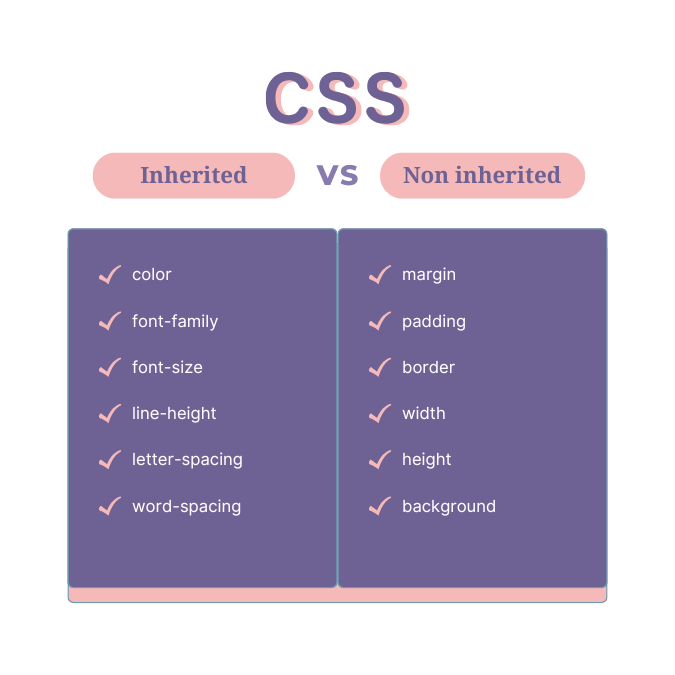
Inherited properties are the ones that naturally cascade down from parent elements. These properties focus on text and font styling because keeping your typography consistent makes your site look better and easier to read.
Examples of Inherited Properties:
colorfont-familyfont-sizeline-heightletter-spacingword-spacingvisibility
When you set any of these properties on a parent element, the child elements automatically pick up the same values unless explicitly told otherwise.
For example:
<div style="color: darkblue; font-family: Arial;">
  <p>This paragraph will inherit the dark blue color and Arial font.</p>
  <span>This span will also inherit the same styles.</span>
</div>
Here, the
colorandfont-familyare inherited by the child elements.
Non-Inherited Properties
Now, here’s where things get tricky. Non-inherited properties don’t naturally pass down to child elements. These are properties that deal with an element’s box model, layout, or visual structure rather than text styling.
Examples of Non-Inherited Properties:
marginpaddingborderwidthheightbackgrounddisplayposition
These properties require you to explicitly define them for each element if you want them applied. They don’t cascade because applying them to child elements by default would often lead to a chaotic and unpredictable layout.
Example:
<div style="margin: 20px; background: lightgray;">
  <p>This paragraph won't inherit the margin or background color.</p>
</div>
In this case, the margin and background are applied only to the div, leaving the p tag untouched.
[**Full list of inherited vs non-inherited properties.**](https://www.w3.org/TR/CSS21/propidx.html)
Forcing Inheritance
To make a non-inherited property follow its parent’s value, we can use inherit. It will directly apply the parent’s value to the element.
p {
  background-color: inherit;
  margin: inherit;
}<div style="background-color: yellow; margin: 20px;">
<p>This paragraph now inherits the yellow background and 20px margin.</p>
</div>This sometimes makes sense to avoid repeating the same properties for every element. Just be careful, using explicit inheritance too much can cause unexpected issues in more complex layouts.
Initial
On the other side, what if you want to reset a property to its default value? That’s why the initial keyword exists. It resets a specific property to its browser-defined default.
p {
  color: initial; /\* Resets to the browser's default text color \*/
}
Unset
If you’re still following along and feeling a bit adventurous, there’s also the unset keyword. It is a combination of inherit and initial. It inherits the value for inherited properties and resets to the default for non-inherited ones.
p {
  color: unset; /\* Acts like inherit \*/
  margin: unset; /\* Acts like initial \*/
}
When Inheritance Becomes a Problem
Inheritance is helpful most of the time, but it’s not always on your side. There are moments when inheritance can cause headaches or break production. Imagine:
- You set a global colour on the body tag, and suddenly all your buttons, links, and headings are unintentionally styled the same way.
- A deeply nested child element picks up inherited styles you weren’t expecting, throwing off your carefully designed layout.
To prevent these headaches:
- Use inheritance carefully, don’t rely on it for everything.
- Be explicit where needed by using inherit, initial, or unset.
- Test your styles using
[automated visual testing](https://applitools.com/blog/visual-testing/).
In Conclusion
CSS inheritance is one of those concepts that sounds simple in theory but can cause a lot of headaches in practice. Inherited properties like color and font-size keep your brand consistent, while non-inherited properties like margin and background give you control over individual elements.
It’s important to understand which properties inherit naturally and how to manage inheritance with values like inherit, initial, and unset. Learning these can lead to cleaner and more predictable styles and a lot less frustration while debugging.
Happy styling! 🕺
Keep reading