How to Think in a Front-End System Design Interview
I’ve been back in system design interviews lately for my new company, Preply. And even though I have done this many times in the past, one thing just became ver

I’ve been back in system design interviews lately for my new company, Preply. And even though I have done this many times in the past, one thing just became very clear to me. The people who stand out are not the ones with the most complex diagrams or the most buzzwords. They are the ones who bring structure, ask good clarifying questions, and explain their thinking step by step.
Based on this, here is the approach I would recommend to increase your chances:
- Clarify Requirements First
- Bring Structure
- Separate UI Structure from State
- Define the Data Model Before Going Deep
- Design the API and Data Flow
- Think About Edge Cases and Follow-Ups
- Practice, Practice, Practice
1. Clarify Requirements First
The most common mistake is starting to draw too early.
Especially if you have built something similar before, there is a high risk that you assume the requirements are the same. You start designing based on your past implementation instead of the actual problem in front of you.
Before talking about components or state, take a step back and understand what you are building. Most system design exercises are intentionally incomplete. That is not a mistake. It is there to see how you handle ambiguity and whether you ask the right questions before jumping into solutions.
Some examples:
- Is this standalone or part of a bigger flow?
- Should I consider mobile or only desktop?
- Is the progress or state persisted, and can users revisit it?
- Are there performance constraints or scale considerations?
- Do we need authentication, roles, or permissions?
- What happens in failure cases (API errors, network issues, partial saves)?
- What are the SLA and Performance targets (e.g., LCP < 2.5s)?
We are not trying to overcomplicate the problem. We are trying to avoid building the wrong thing.
This also does not need to turn into a long Q&A session. A few focused clarifying questions at the start are enough. They create alignment, reduce wrong assumptions, and make the rest of the discussion much smoother.
Clarity first. Architecture later.
2. Bring Structure
After clarifying the problem, bring structure to the discussion.
One of the strongest signals in a system design interview is when someone says something like:
I’ll first outline the component structure, then talk about state and data modeling, and then define the API interactions. After that we can look at edge cases.
That sentence alone changes the tone of the interview.
Without structure, the conversation jumps between UI details, API calls, and edge cases. It feels a bit messy.
For front-end system design, a simple structure that works well is:
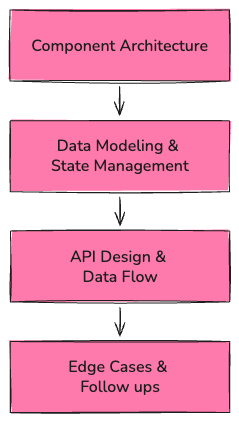
You do not need a complex framework. Just make it clear how you are going to approach the problem.
Structure also naturally helps with pacing. Even though the interviewer has to manage the time, you are the one being evaluated after all. If you spend most of the session in one area, there may not be enough space to cover the rest. A simple rule is to cover components, data, and API first, then go deeper if time allows.
3. Separate UI Structure from State
It is tempting to start drawing components and immediately decide where the data lives and how it updates. That usually leads to confusion because responsibilities are not clearly defined.
Instead, split the discussion into two steps.
Start by describing the UI structure. What are the main parts of the interface, and how are they organised. Keep this focused on boundaries and responsibilities, not implementation details.
Then move to state and data. Identify the required data needed, where it lives, and what the source of truth is. Do not forget to explicitly separate Server State (handled via a caching layer like TanStack Query) from Ephemeral UI State. Define a Revalidation Strategy (for example, Stale-While-Revalidate) to ensure the UI stays in sync with the source of truth without unnecessary spinners.
4. Define the Data Model Before Going Deep
Before diving into detailed components or API contracts, take a moment to define the data model.
What are the core entities in this system? What fields actually matter? How do they relate to each other?
Even in a front-end system design interview, data modelling is important. If the data model is unclear, state management will become messy. If relationships are not defined well, many edge cases will come up later.
But remember to keep it simple. Name the main entities and describe their shape at a high level. Think about identifiers, ordering, and constraints.
For visuals, use whatever makes your thinking clear:
- Boxes and relationships in Excalidraw, draw.io or FigJam
- A small UML-style diagram if relationships matter
- JSON examples or TypeScript types 🌟
Using JSON or TypeScript types is often the clearest option for frontend engineers. It feels natural, easy to reason about, and perfectly converts the intention. Denormalisation here is acceptable.
The important part is that you are modelling the domain, not an API response. Do not confuse the two!
An example:
type Lesson = {
  id: string
  tutorId: string
  studentId: string
  scheduledAt: string
  status: "scheduled" | "completed" | "cancelled"
}
This does not mean the backend returns exactly this shape. It simply shows how you think about the entity inside your frontend system.
5. Design the API and Data Flow
Now it is time to design the API.
GraphQL is widely used in large-scale systems, and in real projects, this step can look a bit different. But in system design interviews, REST-style endpoints are more often used and expected.
You do not need a full API specification. A small sketch of endpoints is enough. For example:
GET    /lessons?subject=english&limit=20
POST   /lessons
PATCH  /lessons/:id
This already tells us a lot. We can fetch a filtered list, create a new item, and update an existing one. But what matters most is explaining when calls happen and how data flows to the client.
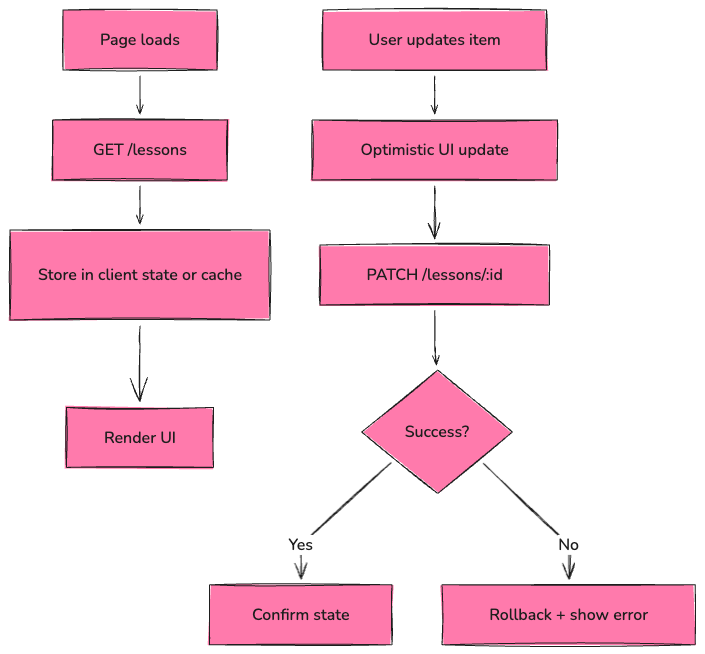
This makes the flow easier to understand. It shows what triggers requests, how data is stored, how the UI updates, and what happens when something goes wrong.
At this stage, what really matters is clarity. The exact endpoint names are not important. What matters is that the contract between client and server is well defined.
It is also a good moment to explain your tradeoffs. For example, you might choose optimistic updates for better UX, knowing that you may need rollback logic. Or you might prefer refetching after mutations for simplicity, even if it adds extra network calls. Maybe you pick pagination instead of infinite scroll because it is easier to control performance.
You do not need perfect answers, and usually, more than one options can work. You just need to show that you understand the implications of your choices.
6. Think About Edge Cases and Follow-Ups
So far, we have defined the component structure, the data model, and the API. Now it is time to showcase flexibility and seniority.
Spend a bit of time on edge cases and the unhappy path.
What happens on refresh? Do we need persistence? What if the network is slow? Maybe a skeleton loader is a simple UX improvement. What if a request fails? What if two updates happen very close to each other? etc.
Then think a bit bigger. What if the list grows large? Do we need pagination or virtualisation? Do we need caching? How do we prevent unnecessary re-renders? What happens under heavy usage?
You do not need to fully solve all of these. Just showing that you are thinking in this direction is enough.
7. Practice, Practice, Practice
System design is another skill. It gets better with repetition.
Pick a few common frontend scenarios and practice them in a timed setting. Give yourself 45 minutes. Follow the same structure every time: clarify the problem, define the component architecture, model the data, sketch the API, then cover edge cases.
Popular exercises:
- Booking or scheduling flow
- Feed with pagination or infinite scroll
- Dashboard with filters and sorting
- Multi-step form
- Autocomplete search
- Real-time chat (WhatsApp clone)
Use a tool like Excalidraw, draw.io or FigJam and simulate the real setup. Draw while explaining your thinking out loud. Make one of the tools feel natural to you.
Also, revisit a few solid resources:
- System Design Interview book by Alex Xu
- Frontend Interview Handbook for frontend-specific examples
- GreatFrontEnd’s system design guides
Try not to memorise solutions. Practice structuring problems and explaining decisions. This way, you will be able to handle different problems thrown at you.
Conclusion
System Design interviews are not about finding a perfect solution. And often there is no right answer, only better trade-offs. The goal is to examine how you approach ambiguity, structure your thinking, and how clearly you explain your decisions.
Start by clarifying the problem, bring structure to the discussion, define your data model, make the API and data flow explicit, and think through edge cases.
Keep it simple. Stay structured. Explain your tradeoffs. Manage your time.
Try not to impress with complexity but to make your thinking easy to follow. Practice this approach, and the interview will become far less intimidating.
Keep reading