How React Codebases Become Hard to Maintain
Let’s assume you start a React project with good intentions and the goal to keep the codebase clean and maintainable.

Let’s assume you start a React project with good intentions and the goal to keep the codebase clean and maintainable.
Inspired by a small tutorial, which is usually a todo app, everything looks clean at first.
But as the application grows, something changes. Logic moves away from the components that use it. More abstractions appear. A simple change suddenly requires touching multiple files. Debugging takes longer than expected.
Tracing back, you will not find many bad decisions from your part. In many cases, simply following common React patterns leads to this path.
The problem is that some of these patterns do not scale well.
Here are the usual suspects.
React Is Only the View Layer
React intentionally focuses on the view layer. This gives us a lot of flexibility, but also a lot of room to make mistakes.
You can choose any router, any state management library, and almost any styling solution. Over the years React ecosystem have mixed many different tools:
State management
- Redux
- Zustand
- MobX
- Context
Routing
- React Router
- Next.js router
- TanStack Router
Styling
- CSS Modules
- Tailwind
- styled-components
- Emotion
In theory this flexibility is powerful. In practice it often leads to fragmentation. Experimenting with different tools and the codebase slowly accumulates multiple ways of solving the same problem.
Styling is a good example. Many React applications relied heavily on CSS-in-JS libraries such as styled-components. Today some of these solutions are in maintenance mode or slowly disappearing, forcing teams to rethink large parts of their styling strategy.
Routing is another example. Frameworks like Next.js evolve quickly. The introduction of the App Router significantly changed how applications are structured.
Because React itself provides very few architectural constraints, we often have to absorb these ecosystem shifts directly into the codebase.
The useEffect Curse
useEffect is one of the core APIs in React. It is powerful but also the easiest way to introduce complexity.
Effects allow us to run side effects after rendering. In practice they often end up handling many different concerns:
- data fetching
- analytics
- subscriptions
- DOM manipulation
- timers
Because effects can run in any component, these side effects tend to spread across the component tree.
A typical example:
useEffect(() => {
  fetchUser()
  analytics.track('profile\_view')
}, \[\])
At first, this feels convenient. Later, it becomes difficult to answer simple questions:
- Where is data fetched?
- What triggers this effect?
- Why did this run again?
When effects appear everywhere, the application becomes harder to understand.
A more subtle issue appears when functions are used as dependencies.
Consider this example:
function Profile() {
  const \[user, setUser\] = useState(null)

  const fetchUser = () => {
    fetch('/api/user')
      .then(res => res.json())
      .then(setUser)
  }
  useEffect(() => {
    fetchUser()
  }, \[fetchUser\])
}
At first, this looks correct. The effect depends on fetchUser, so it is listed in the dependency array.
The problem is thatfetchUser is recreated on every render. That means the dependency changes on every render as well.
The sequence becomes:
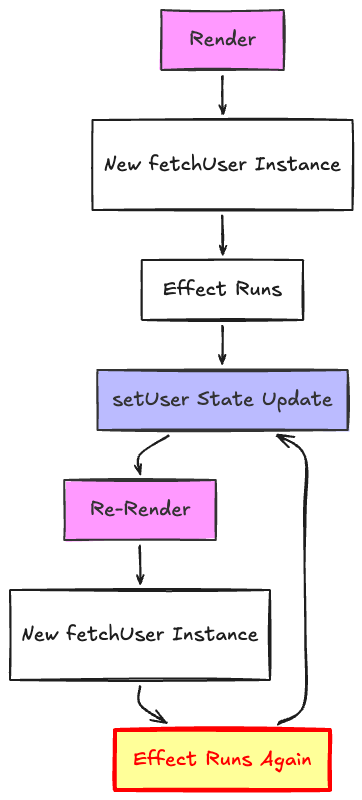
The result is an infinite loop of renders and effects, and your application DDoS-ing your server.
Provider Hell
Context was a godsend to simplify the communication across components, but it is often used as a replacement for proper state boundaries.
Large applications sometimes end up with provider stacks like this:
<AuthProvider>
  <ThemeProvider>
    <FeatureFlagsProvider>
      <ExperimentProvider>
        <PermissionsProvider>
          <App />
        </PermissionsProvider>
      </ExperimentProvider>
    </FeatureFlagsProvider>
  </ThemeProvider>
</AuthProvider>
Each provider introduces a new global dependency.
A component may depend on several contexts without it being obvious from the outside. This creates invisible coupling and makes the application harder to understand.
In extreme cases you might need several providers and hooks just to render a simple piece of UI:
const user = useAuth()
const flags = useFeatureFlags()
const permissions = usePermissions()
const experiments = useExperiments()
return <Button disabled={!permissions.canEdit}>Save</Button>
What looks like a simple button now depends on multiple hidden layers of application state.
Hooks That Hide Complexity
Custom hooks are a great way to share logic, but they can also hide complexity.
A component might look simple:
const { data, loading } = useCorporateDashboardData()Inside that hook, there may be multiple API calls, several context dependencies, and additional hooks.
The component looks simple but the behavior is no longer visible where it is used. When hooks orchestrate large parts of the application, debugging becomes harder.
Over-Componentization
Not every piece of UI needs to be a component.
Breaking everything into very small components can make navigation harder and fragment logic across many files.
Instead of understanding a feature in one place, we have to jump between multiple files to understand what happens when a button is clicked.
Components should represent meaningful UI boundaries, not arbitrary splits.
JSX Increases Cognitive Load
JSX combines markup, state, and logic in a single place. While this is convenient, it can also increase cognitive load.
A simple component can quickly grow into something like this:
{user && (
  <button
    className={isActive ? 'active' : ''}
    onClick={() => trackClick(user.id)}
    disabled={loading}
  >
    {loading ? 'Loading...' : user.name}
  </button>
)}
Structure, conditions, event handlers, and state all live in the same place. As components grow this makes them harder to scan and understand.
And I’m not even touching translations here.
Everything Becomes React
In many projects React gradually expands beyond the view layer.
Modals, forms, routing, animations, and data fetching all become React abstractions.
While this creates consistency, it also means many problems that could be solved with simple browser APIs become wrapped inside custom React solutions.
Sometimes plain HTML or native browser capabilities would be simpler.
Server State VS Client State
One of the biggest sources of complexity is treating server state like local client state.
Fetched data often has very different needs:
- caching
- revalidation
- background refreshing
- stale data handling
- retries
- loading states
But many codebases handle that data with ad hoc effects, local state, and custom hooks.
This creates duplication and inconsistent behavior across the app. One screen refetches aggressively, another keeps stale data forever, and a third stores the same server response in context for no clear reason.
A lot of React complexity is really data synchronization complexity.
Forms Become Mini Applications
Forms are another common source of maintenance pain.
A simple form rarely stays simple for long. Soon it needs:
- validation
- async submission
- error handling
- dirty state
- field dependencies
- conditional sections
- optimistic updates
At that point, the form starts behaving like a mini application inside the application.
This is one reason we often end up building too many abstractions. The problem is real, but the abstractions often become harder to maintain than the form itself.
Performance Complexity
React performance issues are often misunderstood.
The common solution is throwing memoization everywhere:
- useMemo
- useCallback
- React.memo
This creates a culture of defensive optimization while the real issues are usually architectural.
A common problem is a re-render cascade. A state update in a parent or context provider triggers updates across large parts of the component tree:
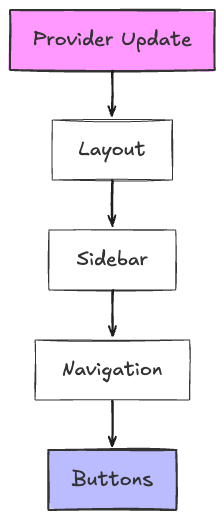
A small state change propagates through multiple layers of UI even when most components do not actually need to update.
Typical causes include:
- large context providers triggering widespread updates
- unstable props flowing through the component tree
- state lifted higher than necessary
Understanding and fixing these issues requires a deeper understanding of React rendering behavior.
Accessibility Challenges
Accessibility is another area where React applications can struggle.
Because JSX mixes structure and behavior, teams often rebuild interactive elements instead of using native browser controls.
Replacing a simple button or link with a custom component can unintentionally break keyboard navigation, focus management, or screen reader behavior.
React does support ARIA attributes, but working with them in component abstractions can still feel awkward. It is easy to lose semantics when every interactive element becomes a styled wrapper.
Achieving good accessibility requires careful attention to semantics, ARIA attributes, and browser behavior.
Hidden Data Flow
In large React codebases it often becomes difficult to answer three simple questions:
- Where does this data come from?
- Who updates it?
- What triggers this render?
Hooks, context, and derived state can obscure how data moves through the application.
When data flow is not explicit, reasoning about the system becomes harder.
Testing Gets Harder Too
As abstractions pile up, tests usually get more brittle.
A component that depends on multiple providers, hooks, feature flags, and async state is harder to test in isolation. Setup gets heavier, mocks become more fragile, and tests drift further away from real user behavior.
That does not just affect quality. It also affects delivery speed. When tests are painful to write and maintain, teams become more hesitant to refactor.
Team Inconsistency Multiplies Complexity
Complexity is not only technical. It is also organizational.
React codebases become harder to maintain when different developers solve the same problem in different ways.
One feature uses context, another uses Zustand, another uses local state. One team prefers container components, another prefers hooks, another relies heavily on utility modules.
Each individual choice may be reasonable. Together they create a codebase with no clear centre of gravity.
Keeping React Simple
React itself is not complex. The complexity usually comes from the patterns we introduce on top of it.
This does not mean avoiding the React way. When building React applications we naturally use components, hooks, state, context, and composition. The problem starts when these primitives become the default solution for everything in the system. That is when UI composition slowly turns into application architecture.
Some principles help keep codebases maintainable:
- collocate logic with the components that use it
- avoid premature abstractions
- prefer explicit data flow
- distinguish server state from client state
- treat hooks as utilities, not architecture
- keep components simple
- use browser primitives when they are enough
- standardise patterns across the team
Approaches like Feature Sliced Architecture try to enforce this kind of separation. Instead of letting everything collapse into components, hooks, and context, they encourage clearer boundaries between UI, business logic, and shared infrastructure. When applied well, structures like this make it easier to keep React focused on rendering and composition rather than turning it into the place where the entire application architecture lives.
A useful mental model is that React should remain close to what it originally was: a library for describing UI.
When routing, data fetching, state management, styling, and application architecture all become layered on top of React abstractions, the system becomes hard to understand.
The most valuable React skill is not knowing every pattern. It is knowing which patterns to avoid.
Keeping React simple is an art. It does not come from following every new trend. It comes from resisting unnecessary abstractions.