Supabase: Build in a Weekend, Scale to Millions
I’m rarely impressed by a new technology. I think the term is called JS fatigue and after many years in the industry using a boring…

Supabase: Build in a Weekend, Scale to Millions
I’m rarely impressed by a new technology. I think the term is called JS fatigue and after many years in the industry using a boring technology will be my preference most of the time.
But there are some tools getting traction once in a while that can’t be ignored.
One of them is Supabase.
Supabase is an open-source alternative to Firebase, an already-established solution to create scalable applications. But Firebase has two drawbacks due to its ownership by Google: it is (quite) expensive and your data is not fully yours.
Supabase solves both issues and offers a wide range of features, including:
- Database: Supabase is built on top of PostgreSQL, which is a powerful and scalable relational database.
- Authentication: Easily implement authentication, with support for email, passwordless login, social login, etc.
- Storage: Secure and reliable object storage for your files from images and videos to documents and archives. It uses a global CDN to reduce latency and improve performance for your users.
- Real-time data synchronization: Supabase can keep your data synchronized across all of your users’ devices in real-time using webhooks with no effort from your side.
- Serverless Functions: Support the creation and deployment of serverless functions, which can be used to automate tasks, process data, and more.
- Built-in security: Supabase relies heavily on restricting access on a database level using policies. Restricting access on a database level makes the most sense and keeps your data safe.
Additionally, another big advantage is the excellent documentation. A lot of high-quality and easy-to-follow guides and resources to get you started and many step-by-step tutorials to help you understand how everything works.
One of the examples is about building a to-do list with many different front-end frameworks. Let’s see how this compares with building a to-do list with Express and Mongo which we recently experimented with.
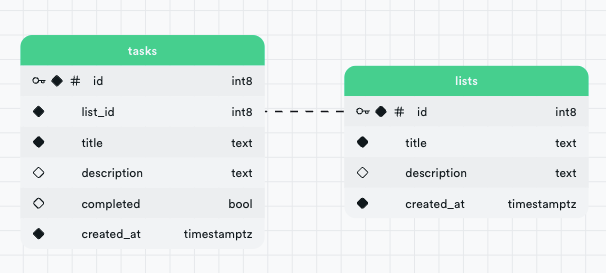
Our application will have two different tables
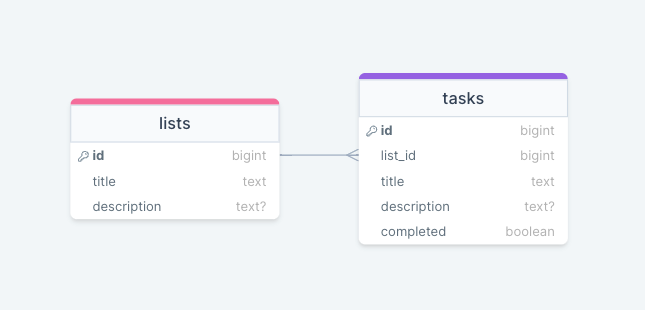
A task has an id, a title, an optional description and a flag to hold the completed status. A task can belong to a list that also has an id, a title and an optional description.
Setting up Supabase
Self-hosted and local development options are available but to get familiar with the platform we will use the hosted version that comes for free. So head over to [https://supabase.com/dashboard/sign-in](https://supabase.com/dashboard/sign-in). and login or create a new account. You will have to create an organization and then a project in a region closest to you.
Upon successful creation, you will get a public (anon) key that we will need to connect the client to supabase. We will revisit this later.
We get a lot of goodies by just creating a new project. Let’s dive into table creation first.
Setting up the Tables
In order to create a table we have two options Table Editor and SQL Editor. For demonstration purposes, we will create one table with each option starting with the Lists table. Head to the table editor and let’s create a new table using the UI.
Fill in the following info
- Name:
lists - Row Level Security (RLS):
Disabled— This will allow everyone to edit or delete data in this table which is obviously not secure. We will dive deeper later. - Columns:
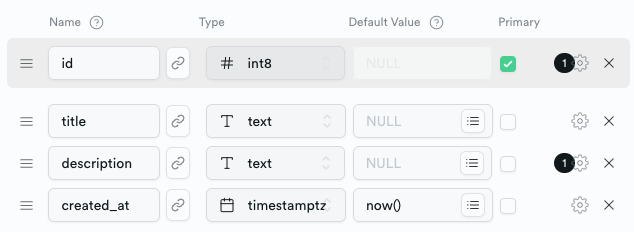
Make sure to disable the title being nullable from the gear on the right.
✅ Table lists is ready to go!
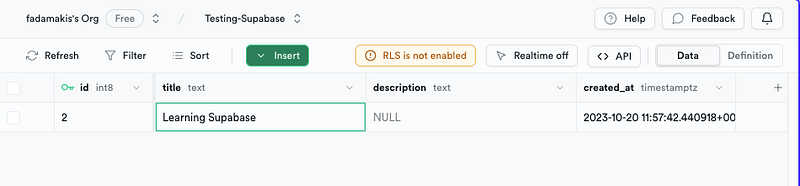
The above form will run a SQL query behind the scenes to update our postgres with a new table. For now the table is empty, lets use the UI to insert a new row.
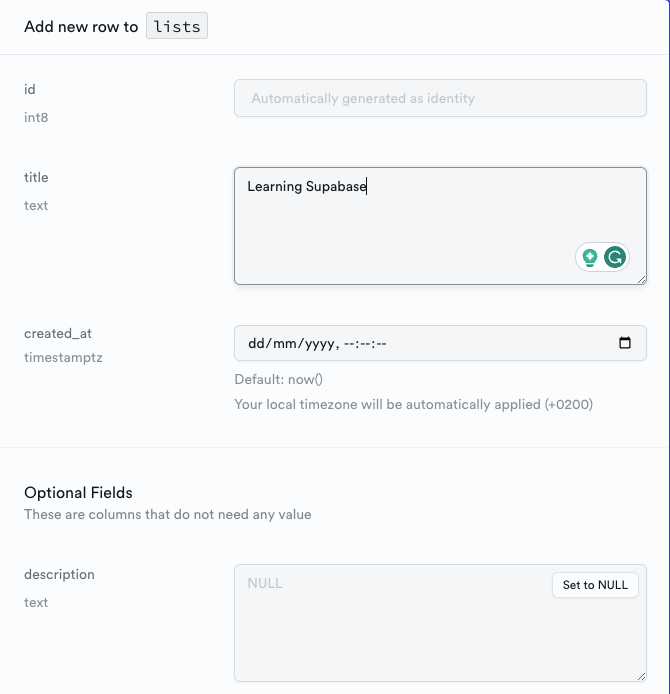
We only need to insert a title and a new row will be added. We can overview the changes in the previous screen.
We could do the same for the tasks table, but let’s try to understand how things work behind the scenes by using the SQL editor and typing the query ourselves.
create table tasks (
  id bigint generated by default as identity primary key,
  list\_id bigint references tasks (id) on delete cascade not null,
  title text not null,
  description text,
  completed boolean default false,
  created\_at timestamp with time zone default timezone('utc'::text, now()) not null
);
✅ Success. No rows returned
We created the table tasks with an autogenerated id as a primary key, a foreign key list_id referencing the id of the lists table, a required title and a description completed and created_at columns.
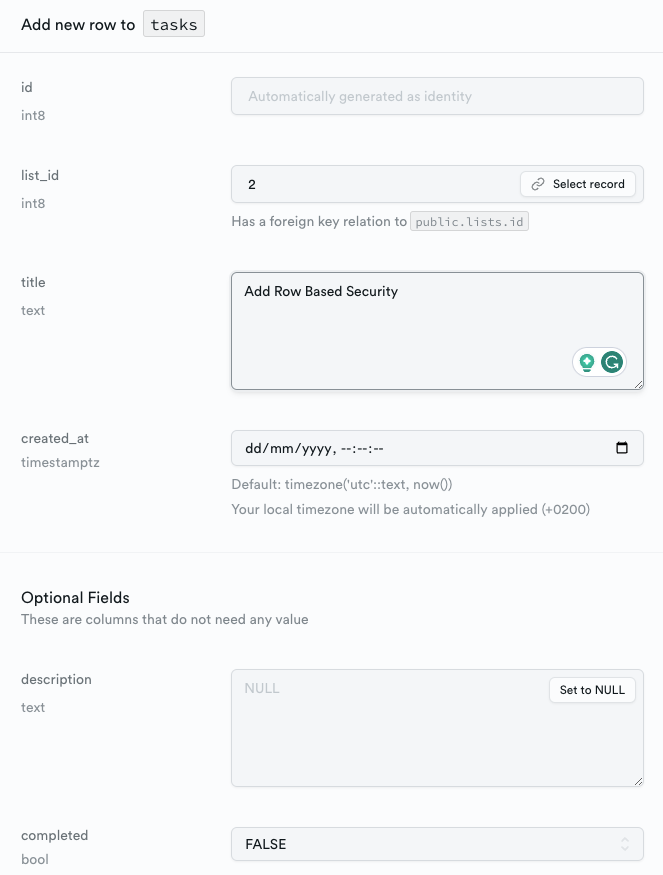
We can review the table from the table editor view and insert a new row as we did before.
We can review our database schema in Database > Schema Visualizer
Retrieving Data from the Client
There is documentation and sample applications for every popular language and framework. Out of Javascript, Flutter, Python, C#, Swift and Kotlin, we will use Javascript because it is the best. Especially If you only know Javascript like me. If you disagree you can follow the guide for the language of your choice [here](https://supabase.com/docs#client-libraries:~:text=Client%20Libraries-,%23,-Javascript).
Connecting to supabase with javascript is easy thanks to the available SDK that does all the heavy lifting for us given we provide the URL and key of our project.
import { createClient } from "@supabase/supabase-js";

// Create a single supabase client for interacting with your database
const supabase = createClient(
  "https://xyzcompany.supabase.co",
  "public-anon-key",
);
This is all that we need to start performing queries to our database.
const { data, error } = await supabase.from("lists").select();

console.log("data:", data);
console.log("error:", error);
The response will be
data: [
  {
    id: 2,
    title: 'Learning Supabase',
    description: null,
    created\_at: '2023-10-20T11:57:42.440918+00:00'
  }
]
error: null
Inserting Data
const { error } = await supabase
  .from('tasks')
  .insert({ title: 'Test the API', list\_id: 2})
The change will be reflected if we fetch the task or if we visit the table editor in the supabase dashboard.
We can update or delete a task in the same way. And we can use filters to narrow down the data we want to affect.
You can find the code of the examples on [GitHub](https://github.com/fadamakis/testing-supabase). Just make sure to update the .env file with your credentials.
And if using vanilla-js in 2023 is not your thing, you can find an official todo app example in many languages including vue, react, angular and [svelte](https://github.com/supabase/examples-archive/tree/main/supabase-js-v1/todo-list/sveltejs-todo-list).
Understanding Row-Level Security
You might have noticed that all of the lists and tasks are publicly available to everyone which is not always desired. This is because we disabled row-Level security when creating the tables.
Row-level security is a feature that allows us to control which users have access to which rows in a database table. It works by defining policies that restrict access to certain rows in a table. These policies can be based on a variety of factors, such as the user’s role, the user’s location, or the data in the row itself.
For example, we could create a policy that allows users to only access the lists they have created, given first that we have some kind of authentication in place. We could also allow a task to only be visible from a list that it belongs to using the foreign key constraint that we set up earlier. These policies would prevent users from viewing data they are not supposed to.
Each policy is attached to a table, and the policy is executed every time a table is accessed. You can think of them as adding a WHERE clause to every query.
For example a policy like this
create policy "Individuals can view their own task lists."
on lists for select
using ( auth.uid() = owner\_id );
would translate to
select \*
from lists
where auth.uid() = todos.owner\_id; \-- Policy is implicitly added.
You can create a new policy with the above SQL in the SQL Editor or use the more user-friendly editor in the Table Editor.
More about policies and row level restrictions
Additional Features
On top of creating a secure and fully functional API on top of PostgreSQL we can have some powerful features out of the box like Authentication, Storage, Real-time data synchronization, Edge Functions and GraphQL support.
Next Steps
I would need to write dozens of articles to unwrap the full capabilities of supabase (and I will probably write more) but I will never be able to express how good the official documentation is. Start by exploring the features and architecture and then dive into one of the tutorials or quickstarts of your favourite framework. The official youtube channel is also full of great hands-on guides.
Supabase motto is Build in a weekend. Scale to millions. Go make that happen 🚀🚀🚀
![Better Vue Components with TypeScript [12 examples]](/_astro/img-1.D1-fPpiS_ZnBJgo.webp)
![[Quiz] Dependencies Vs devDependencies](/_astro/img-1.LG0TF6t9_Z1YDO7w.webp)