A Front-End Application Folder Structure that Makes Sense
One of the most critical and challenging aspects of a large-scale application is a good and reasonable folder structure. Before considering…

A Front-End Application Folder Structure that Makes Sense

One of the most critical and challenging aspects of a large-scale application is a good and reasonable folder structure. Before considering breaking the codebase into multiple applications using micro frontends there are some steps that can be followed to improve the architecture at a project level and make the transition easier if you ever consider that path.
The goal is to apply some kind of modularisation that will make the codebase easier to understand by setting boundaries between features and minimizing code coupling and side effects.
Default Project Structure
By default when scaffolding a new project using one of the popular front-end frameworks the component structure is flat and follows no hierarchy whatsoever.
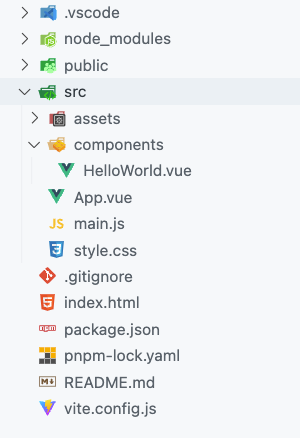
This example uses Vue default project structure but React also doesn’t have an opinion on how you put files into folders.
- The
assetsdirectory stores static assets such as images, fonts, and CSS files used throughout the application. - The
componentsdirectory contains reusable Vue components. A flat hierarchy is recommended. - The
main.jsfile serves as the entry point of your application, enabling Vue initialization and configuration of plugins or additional libraries. - The
App.vuefile represents the root component of your application, acting as a container for other components and serving as the main template.
We have seen the hard way that for a large project, this architecture will soon get out of hand. Some kind of modularisation is needed to be able to easily locate a given file, set boundaries between features, and avoid tight coupling of the components.
Breaking the Application into Multiple Features
Any large application is broken into multiple independent features. Identifying them is not always easy and straightforward but it gets better after some time and experience. Let’s try to break together a popular application into sections as an exercise.
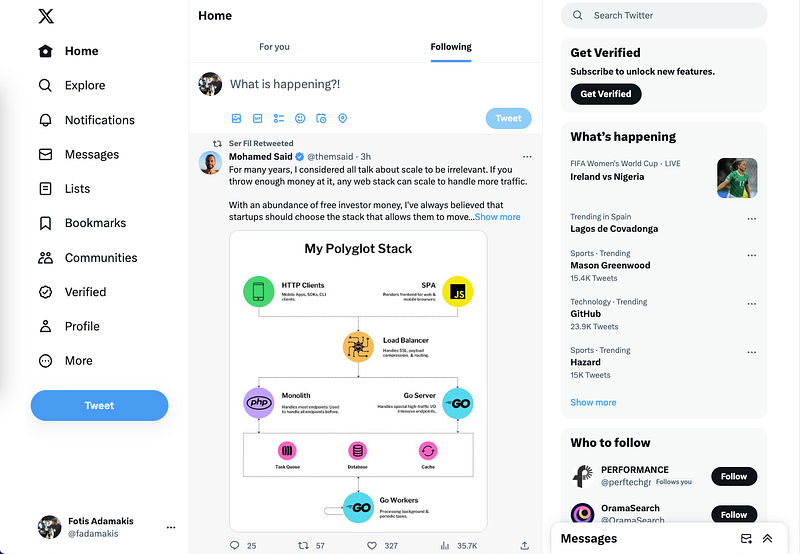
Twitter’s homepage has a lot going on. The timeline which is the core of the page is surrounded by many features like a navigation, a tweet creation section, a sidebar with multiple sub-components, a floating messages component etc.
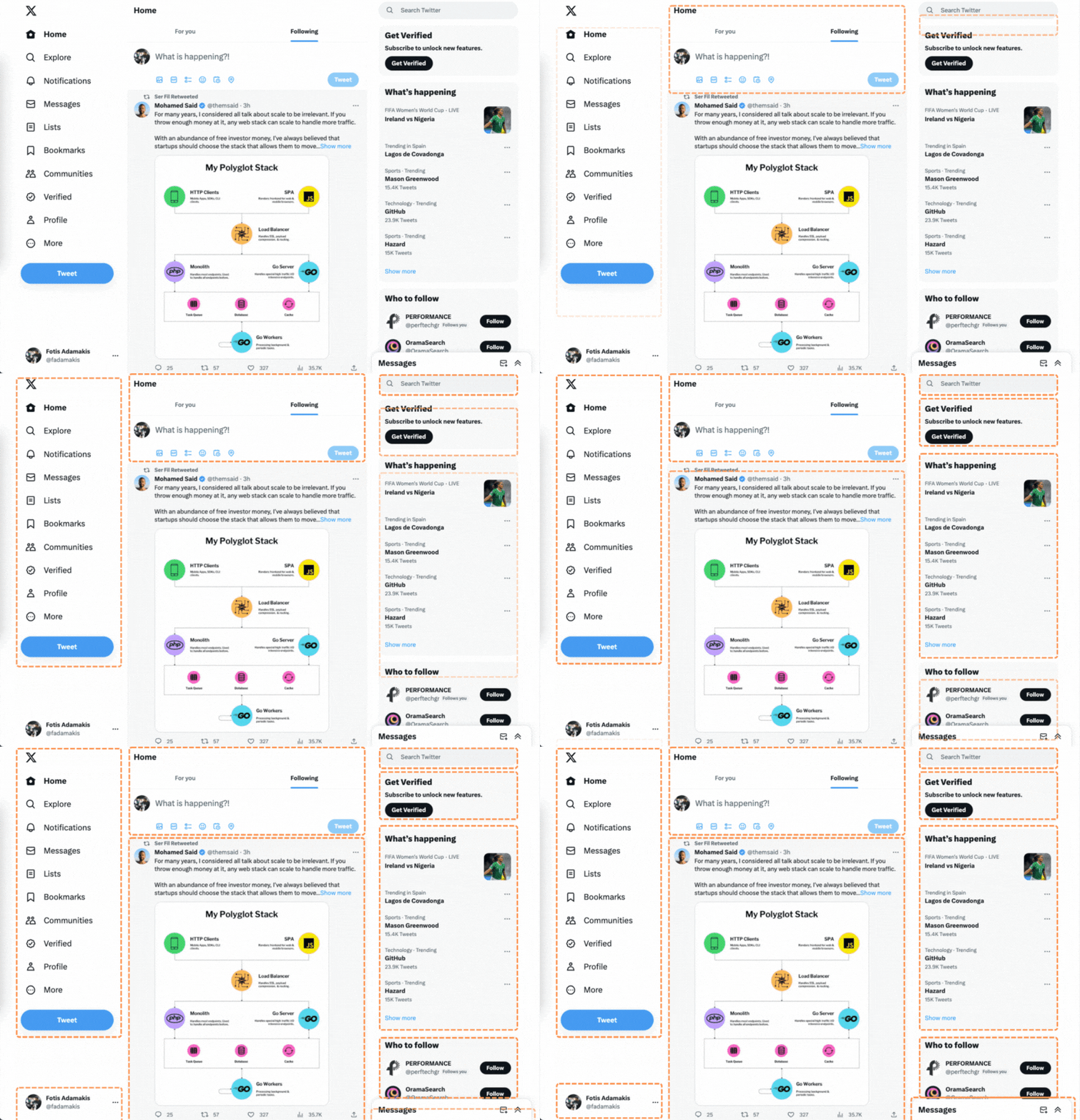
Having all of the components that make up these features in the same folder is not maintainable and locating one of them would be extremely hard even when using the IDE’s quick find option.
A More Elaborate Project Structure
From experience, a better and more comprehensive file structure looks like this:
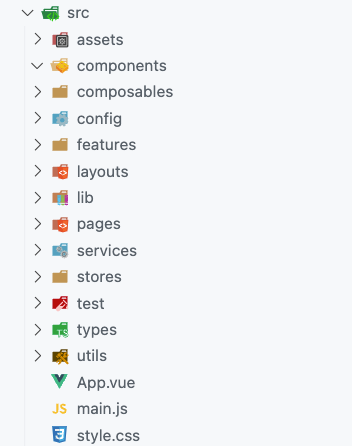
components: All shared components that are used across the entire application.composables: All shared composables.config: Application configuration files.features: Contains all the application features. We want to keep most of the application code inside here. More on this later.layouts: Different layouts for the pages.lib: Configurations for different third-party libraries that are used in our application.pages: The pages of our application.services: Shared application services and providers.stores: Global state stores.test: Test-related mocks, helpers, utilities, and configurations.types: Shared TypeScript type definitions.utils: Shared utility functions.
Run the following command on your project root to create any folder that doesn’t exist already.
mkdir -p src/{composables,layouts,pages,utils,assets,config,lib,services,test,components,features,stores,types}Three important things to note:
- The
Pagesfolder is already some kind of modularisation by default both in terms of contexts and in actual chunks that a build tool like webpack or Vite will create. Having all the pages in one place is very helpful but the logic inside them should be kept to the minimum. - For easier maintenance and scalability, we aim to keep most of the application code inside the
featuresfolder. Every feature folder should contain domain-specific code for a given feature. - In a perfect world, we shouldn’t have shared components, composables, stores and services and everything would be inside the corresponding feature folder. Unfortunately in real projects, this cannot be avoided but we should plan ahead and be extra careful when adding something to these folders.
Features Folder
As we mentioned earlier, the majority of our application should live inside the features folder split into multiple sub directories.
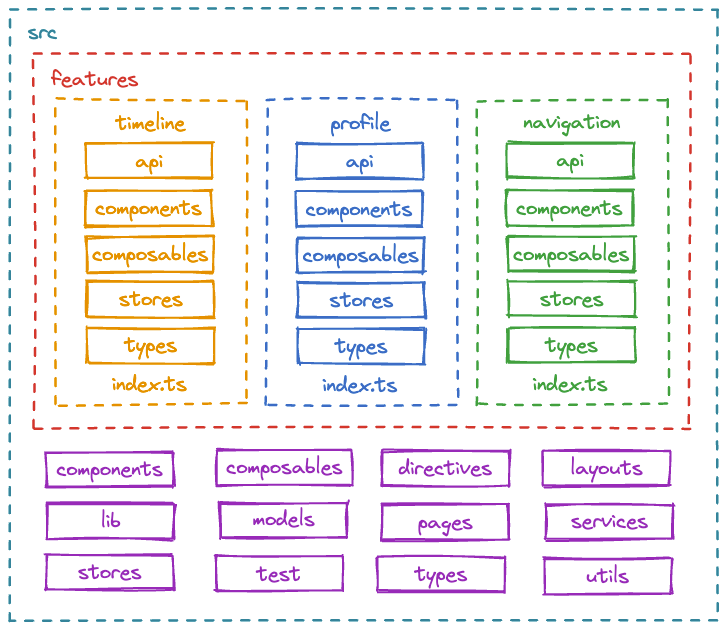
api: All the fetch logic goes here. This decouples the API and the UI.components: Feature specific components.composables: Feature specific composables.stores: The state management code. Multiple sub-modules are expected and actually encouraged.types: Feature specific typeScript type definitions.index.ts: This is the entry point of the feature. It behaves as the public API of the feature, and it should only export things that should be public for other parts of the application.
The above index.ts file serves as the public API of each feature. When importing something from another domain it should be done only through this file. This should prevent circular dependencies, and also make it easier to find the source of an import.
\# Bad 🚫 🚫 🚫
import { UserProfile } from '@/features/profile/components/UserProfile.vue'

\# Good ✅ ✅ ✅
import { UserProfile } from '@/features/profile'
We can enforce this pattern by using the no-restricted-imports ESLint rule.
rules: {
    'no-restricted-imports': [
      'error',
      {
        patterns: ['@/features/\*/\*'],
      },
    ],
    'import/no-cycle': 'error',
    ...
}
Conclusion
Feature-oriented architecture is an effective and battle-tested way of structuring complex projects. It allows us to decouple the code into separate modules, and scale our application as it grows more complex. This will improve the development experience by increasing the predictability of the codebase, decreasing debugging time and making onboardings easier.
Is your application structure similar to this? Are you using something different? Please leave a comment below.